
Skip to content
Home
Metabacklinks
  • Home
  • Services

    Self-managed website

    A premium website that updates itself.

    E-commerce website

    Sell online, without giving it a thought.

    Lead acquisition

    Your visitors become contacts.

    SEO / GEO referencing

    Get found on Google and in AI.

    Advertising campaigns

    Advertising that pays off, managed for you.

    Second opinion

    We check other people’s work.

    Redesign & maintenance

    We rebuild your website, then we look after it.

    Advice and training

    We train you in web and AI.

  • Expertise

    Artificial intelligence

    Understand AI, learn how to use it and automate your everyday tasks.

    Web & digital

    Your online presence designed end to end, from the first screen of your website to the sale.

    Business software

    CRM and ERP connected to your business, to manage your clients and processes in one place.

    Our CRM

    Our CRM

    Centralize your leads and clients, connected to your website and your agents.

  • AI agents

    Supervisor Agent

    A true conductor. Leads the team and keeps you informed of work in progress.

    Webmaster Agent

    Maintenance and backups. Optimized code for fast websites that stay online.

    SEO / GEO Agent

    Audits, indexing and performance. Your visibility on Google and in AI.

    Copywriting Agent

    Optimized content and editorial strategy.

    Web Marketing & Leads Agent

    Landing pages, conversion funnels and client lead generation.

    Community Manager Agent

    Social media, e-reputation and Google reviews.

    Conversational Agent

    Welcome, qualification and appointment booking. Also handles reminders.

    Cybersecurity & Compliance Agent

    Security, monitoring and GDPR compliance. Applies patches and reduces risks.

    SEA Specialist Agent

    Google Ads, Meta Ads and LinkedIn Ads. Costs tailored to your budget.

    Translator Agent

    A true linguist. Translation and adaptation into several languages.

    Growth Hacking Agent

    Experiments and growth levers. Capture your future leads.

    Tech Watch Agent

    Watching web, AI and trend developments. An investigative journalist.

  • Sectors

    Real Estate & Construction

    Agencies, developers, architects and construction.

    Health & Medical

    Practices, clinics, therapists and independent healthcare professionals.

    Tourism and Gastronomy

    Hotels, guesthouses, restaurateurs, caterers and estates.

    Education & Training

    Private schools and training centers.

    Public & Institutional Sector

    Town halls, local authorities, associations and federations.

    Founders & Inventors

    Launch your business, your network or your professional tool.

    Industry & Large Accounts

    Large companies, pharma, portals and extranets.

    Local Businesses & Professionals

    Garages, hairdressers, lawyers, notaries and artisans.

  • News & Guides

    All articles

    The whole blog, every section.

    News & analysis

    What is moving, and what it changes.

    Tutorials

    Step-by-step procedures.

frFrançais
Contact us
Home
Metabacklinks

Menu

  • Home
    • All services
    • Self-managed website
    • E-commerce website
    • Lead acquisition
    • SEO / GEO referencing
    • Advertising campaigns
    • Second opinion
    • Redesign & maintenance
    • Advice and training
    • All our expertise
    • Artificial intelligence
    • Web & digital
    • Business software
    • The whole team
    • Supervisor Agent
    • Webmaster Agent
    • SEO / GEO Agent
    • Copywriting Agent
    • Web Marketing & Leads Agent
    • Community Manager Agent
    • Conversational Agent
    • Cybersecurity & Compliance Agent
    • SEA Specialist Agent
    • Translator Agent
    • Growth Hacking Agent
    • Tech Watch Agent
    • All sectors
    • Real Estate & Construction
    • Health & Medical
    • Tourism and Gastronomy
    • Education & Training
    • Public & Institutional Sector
    • Founders & Inventors
    • Industry & Large Accounts
    • Local Businesses & Professionals
    • All articles
    • News & analysis
    • Tutorials

Share your Meta Business account with an agency

David TouzetDavid Touzet·Updated on 11 August 2026·5 min read
  1. Metabacklinks
  2. ›
  3. Articles
  4. ›
  5. Account access

You want to hand us your ads without giving us your passwords. That is exactly what Meta provides for with delegation between businesses. You stay the owner of your Page, your Instagram account and your ad account, and you share only the access that is useful. Here is the method, and the one setting not to miss.

  • Step 1 · Check your Meta Business portfolio
  • Step 2 · Add the agency as a partner
  • Step 3 · Choose Full control, not partial access
  • Step 4 · Send the invitation and check that it is accepted
Step 1

Check your Meta Business portfolio

This is the starting point. Many people run their Page from their Facebook profile, with no business portfolio. Creating that portfolio is free, takes 5 minutes, and unlocks everything else.

A word on the vocabulary, because it has changed. What Meta used to call Business Manager is now called the business portfolio. It is the same space with a new name. Both terms are still going around depending on the screen and the tutorial, so do not let it throw you.

Open business.facebook.com.

  • If you land on a dashboard in your company's name, all is well, move on to the next step.
  • If the site offers to create an account, follow the wizard. Company name, your name, your work email, then attach your Facebook business Page. The whole wizard is set out in our guide on how to create your Meta ad account, payment method included.

Then switch on two-factor authentication from the security centre. That is the confirmation by text message or by app when you log in. Meta asks for it before you can delegate access, and it protects your account along the way.

This job is done on a computer. The portfolio settings have no complete equivalent in the mobile app. If you only have a phone, open business.facebook.com/settings in your browser and request the desktop version of the site. Everything works, it is just a bit smaller.
Open Meta Business Suite ↗Create your Meta ad account
Check your Meta Business portfolio
Step 2

Add the agency as a partner

The shortcut that lands you exactly on the right screen is business.facebook.com/settings/partners. That is the address to remember, it avoids every detour.

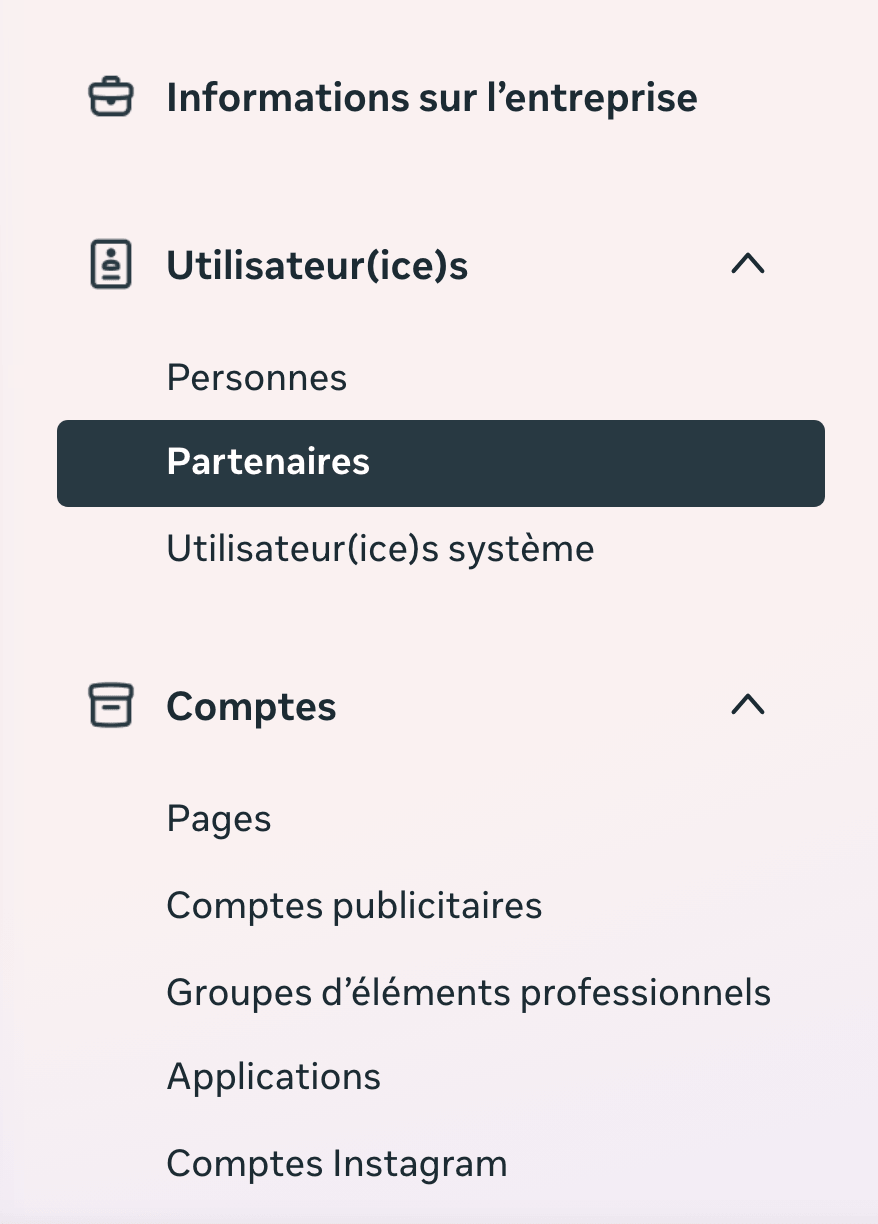
Otherwise, open the portfolio settings, then in the left-hand menu, Users then Partners. A useful marker, the cog in Meta Business Suite leads somewhere else, to publishing settings. If you cannot see a Partners tab, that is the point to check.

Go through Partners, not through the People tab. Delegation between businesses is the right method, and it leaves you the owner of everything.

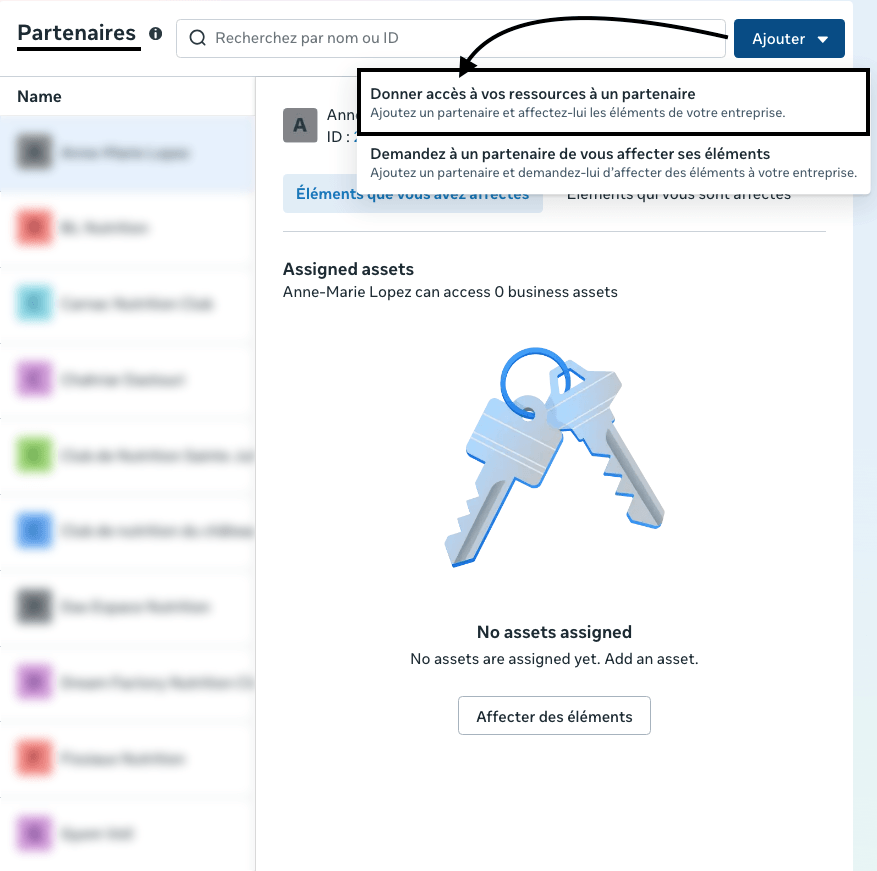
  • Click Add, then Give a partner access to your assets.
  • In the ID field, paste our business ID. It starts with 32497801161, followed by 4 digits that we do not publish here. Ask us for them and we will give them to you straight away. This is the only step where you need us, the rest is done without us.
  • Select the assets to share. Your Facebook Page, your Instagram account and your ad account.

If the labels are not exactly those. Meta renames its screens several times a year, and Partners has already carried other names. Trust the meaning of the action, granting access to another business, and use the settings search bar with the word partner. The feature is still there.
Add the agency as a partner
Step 3

Choose Full control, not partial access

This is the most important step on the page. 1 click settles it, so take 30 seconds to put it in the right place. Meta offers 2 levels, and their names are a little misleading.

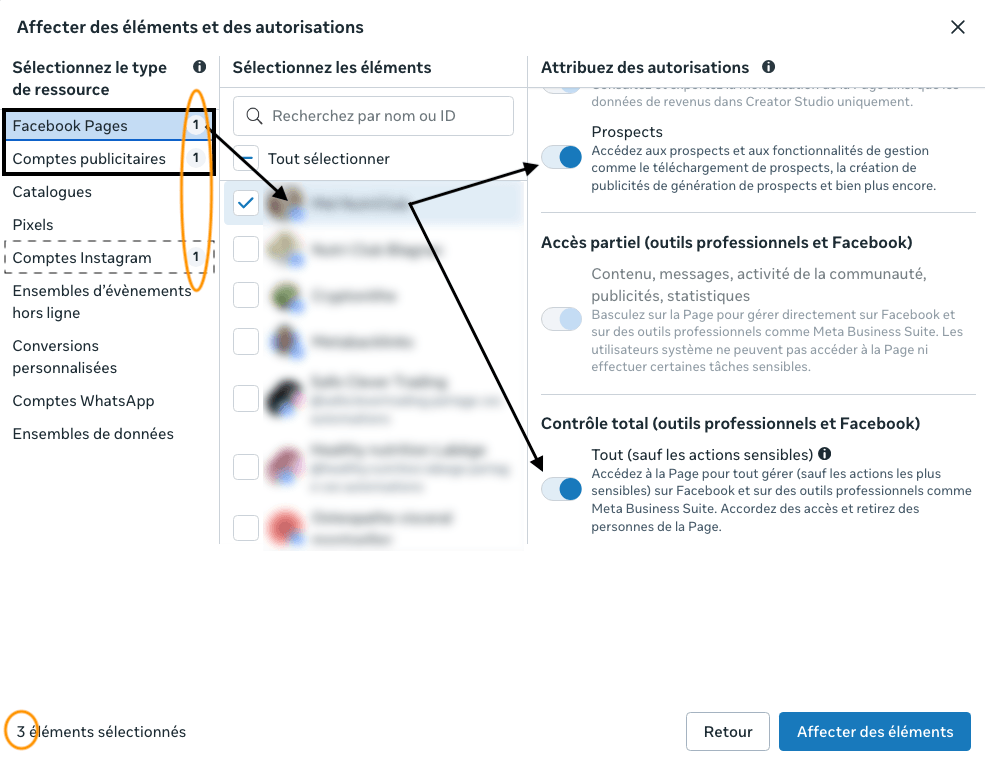
  • Partial access. It covers content, messages, community activity, ads and insights. It sounds more than enough. In reality it does not open up the reading of lead forms, the small forms your customers fill in from an ad.
  • Full control. This is the level that lets you retrieve those enquiries and genuinely run your campaigns. It is the one to choose.

For smooth advertising management, switch on Full control on the Facebook Page, and Manage campaigns on the ad account, so we can create and optimise the ads.

Why we press the point. With partial access, everything appears to work, and the enquiries left by your customers stay at Meta. Nothing flags it up. Sorted on day one, this point never comes up again, and every enquiry reaches you.

If the 2 levels carry other names. Meta has already renamed them. Remember the meaning rather than the word, and take the broader of the 2, the one that includes lead management.
Choose Full control, not partial access
Step 4

Send the invitation and check that it is accepted

Click Save to send the invitation. One thing remains to be said. The invitation goes to our portfolio and we have to accept it on our side for the connection to become active.

Until that approval happens, the share shows as pending. That is normal, and there is nothing for you to do. You can check its status whenever you like at business.facebook.com/settings/partners.

Once the link is accepted, come back to that same screen and check 2 things. Our name does appear in the partners list. And the level shown on your Page is indeed Full control. 10 seconds of checking, which guarantees that every enquiry will reach you.

To remove the access one day. Same screen, you click the partner then Remove. Your accounts, your campaigns and your history stay intact. This is your house, you open and close the door whenever you like.

2 extras if you are starting out on Meta. Creating the account works perfectly well from a phone, as shown in open a Meta Business Suite account on mobile. And to reach your followers once the Page is up, the @followers mention is still the most effective free tool.

Liens utiles

Useful links to keep to hand

Keep these pages open while you work.

  • Meta Business, log in
  • Portfolio settings, the right place
  • Partners, the direct screen
  • Security centre, for two-factor authentication
  • Create a Facebook business Page
  • Hand us your advertising campaigns
  • Our web and digital expertise
  • Our AI agent dedicated to advertising
  • Structuring your Meta ad account
  • Growing your Facebook Page without advertising
FAQ

Frequently asked questions

No, never. Sharing goes through a delegation between businesses. You stay the owner of your accounts and you can remove the access in one click at any time.
You are most likely in Meta Business Suite rather than in the portfolio settings. Open business.facebook.com/settings/partners directly, the address lands exactly on the right screen. If the label has changed since, search for the word partner in the settings search bar, the feature is still there.
Check that two-factor authentication is switched on for your account. Meta requires it before you can delegate access. Without it, the option does not appear.
That means it is not connected to your business portfolio yet. Connect it first under Accounts then Instagram accounts, then come back to the step where you choose the assets.
It is almost always the level of access. Partial access allows posts, messages and insights, but it blocks the reading of lead forms. Only Full control lets you retrieve the enquiries left by your customers. Go back to the shared Page and switch the setting to Full control.
No, several partners can coexist on the same Page. An agency cannot, however, pass on to another an access it received itself. If your previous supplier holds the Page, it is you, the owner, who has to do the sharing from your own portfolio.
The invitation goes to our business portfolio and we have to accept it on our side to activate the connection. Until that approval happens, the share shows as pending on your side. That is normal.
Yes, it is the same space. Meta renamed Business Manager as the business portfolio. Both words are still going around depending on the screen and the tutorials you read elsewhere. Trust the address business.facebook.com, it has not moved.
It is far more comfortable on a computer, because the portfolio settings have no complete equivalent in the app. From a mobile, open business.facebook.com/settings/partners in your browser and request the desktop version of the site. Everything works, the display is simply smaller.
On the same partners screen, you click the partner then Remove. The access is cut immediately. Your accounts, your campaigns and your history stay intact.
Where to start?

A straight conversation. No sales patter.

We build your site bespoke, and our AI agents keep it alive. Updates, content, search visibility, security, it all runs without you having to think about it once. You settle the broad direction, the AI carries it out. And you get your evenings back.

Talk to us now
Logo Metabacklinks

Web & AI partner in Montpellier. We build websites self-managed by AI agents. You stay in control.

13 rue de Lavalette, 34830 Clapiers
Montpellier metropolitan area
06 68 34 12 84 · contact@metabacklinks.com

FacebookInstagramWhatsAppTelegramSMS
Services
  • Self-managed website
  • E-commerce website
  • Lead acquisition
  • SEO
  • Advertising campaigns
  • Second opinion
  • Redesign & maintenance
  • Advice and training
Task automation
  • Social channels that run themselves.
  • Fresh content, all the time.
  • Every page, in every language.
  • Quoted by AI. Found on Google.
  • An order book that fills itself.
  • Every client welcomed, at any hour.
  • A website kept up to date, on its own.
  • A website protected, day and night.
Latest articles
  • Create a Google Ads account11 Aug 2026
  • Create a LinkedIn Company Page11 Aug 2026
  • Create a Facebook business Page4 Aug 2026

© 2026 Metabacklinks · · Legal notice· Glossary· Emojis· Sitemap· LLM timeline· Partners· About· CRM